Most days bring new tech updates and something new to learn. Lately the discourse around AI tools is noisy—some say they are too expensive, others that they underperform—and the reality I see is mixed. None of that stopped me from using them deliberately.
Over time I have used GitHub Copilot, ChatGPT, Gemini, and Claude for planning, brainstorming, writing code, and review. Recently Claude Design joined the stack for turning plans into visuals.
MedRecord is a personal and family Android app for on-device health notes: people, medications, labs, conditions, reminders, and documents. It is not a medical device; data stays encrypted on the device unless you add export later. The app README targets 0.2.0-phase1, min SDK 26, compile/target 35, Apache-2.0.
The problem
I needed one place—app or site—to track medicines, lab reports, prescriptions, and invoices for myself and family members. The problem statement was simple; turning it into a scoped product and a codebase that stays honest under encryption, migrations, and deletes took structure, not vibes alone.
Ideating / planning
I used Claude Opus 4.7 in Adaptive Mode to brainstorm and produce a very detailed plan: not only features but package names, module boundaries, and folder layout so implementation would not drift. I chose an Android app so the experience stayed native, offline-first, and suitable for sensitive health-adjacent data on device.
Tooling: Claude — Opus 4.7 (Adaptive Mode).
Full package-level notes and migration-oriented detail live on a companion page: MedRecord build plan (reference).
Wireframes
With the plan in place, I used Claude Design to generate wireframes anchored to that spec, then reiterated with Claude Sonnet 4.6 using minimal prompts—enough to refine flows without rewriting the whole design system. The goal was high-fidelity references I could implement in Compose, not throwaway sketches.
Building
Once the plan and wireframes were solid, execution moved to Cursor with the Composer model (Composer 2)—relatively lower cost than heavy planning models for long implementation sessions, which fit a long build phase (Kotlin, Compose, Room + SQLCipher, migrations, WorkManager workers, Detekt cleanups).
The sections below are grounded in the README and code layout of the MedRecord repo, including work such as records delete, medication delete, and Detekt-driven UI refactors—verify any claim against your tree and commits if your branch differs.
Wireframe vs app (Claude Design → implementation)
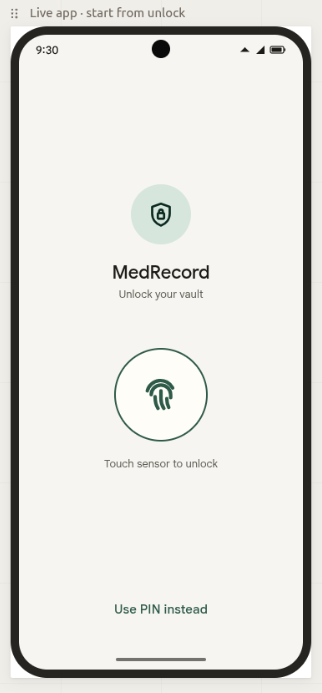
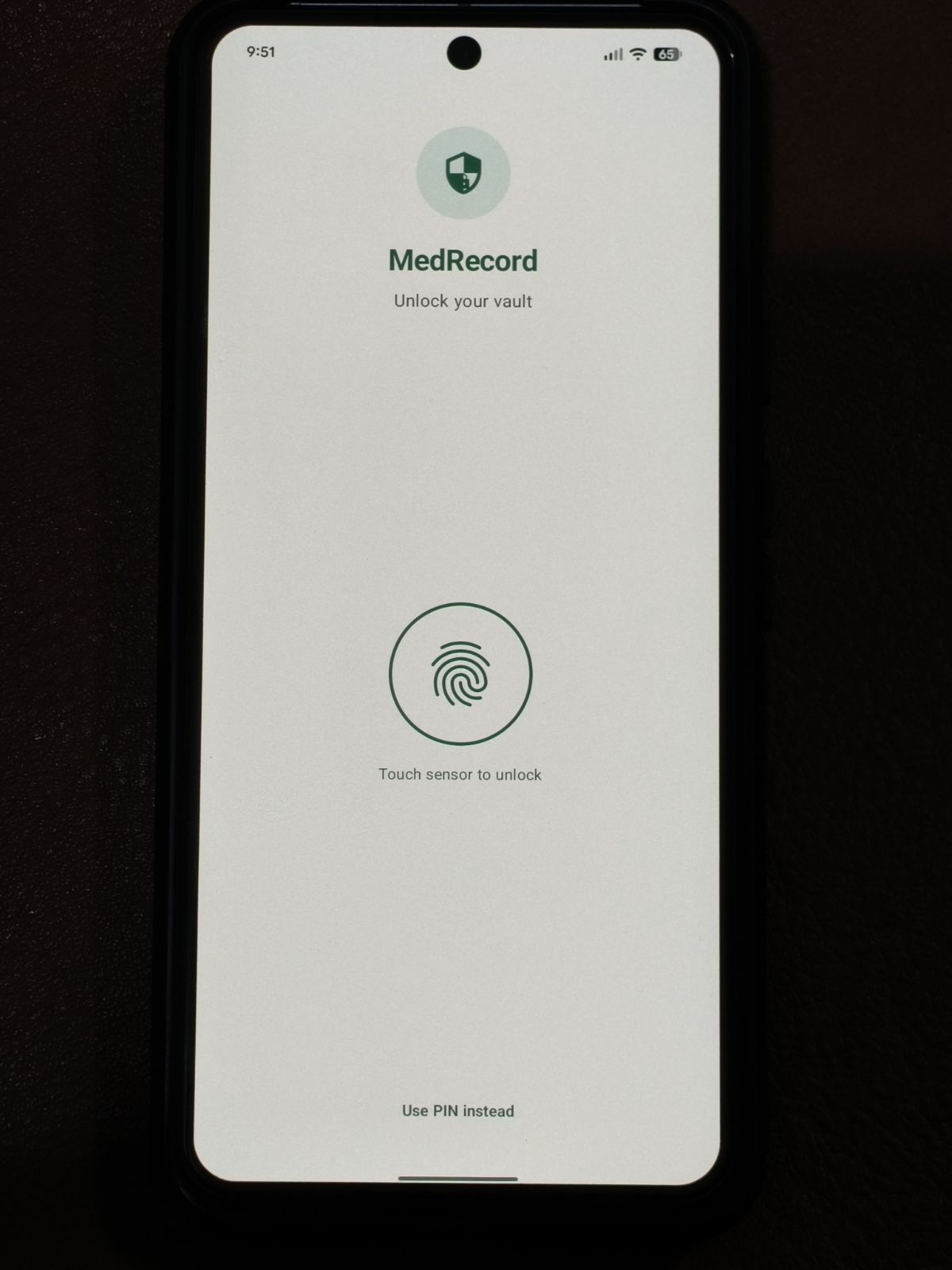
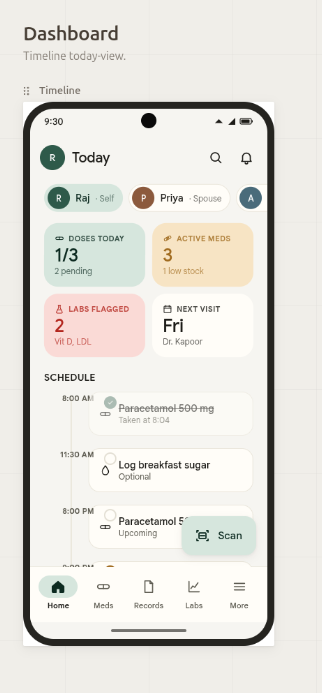
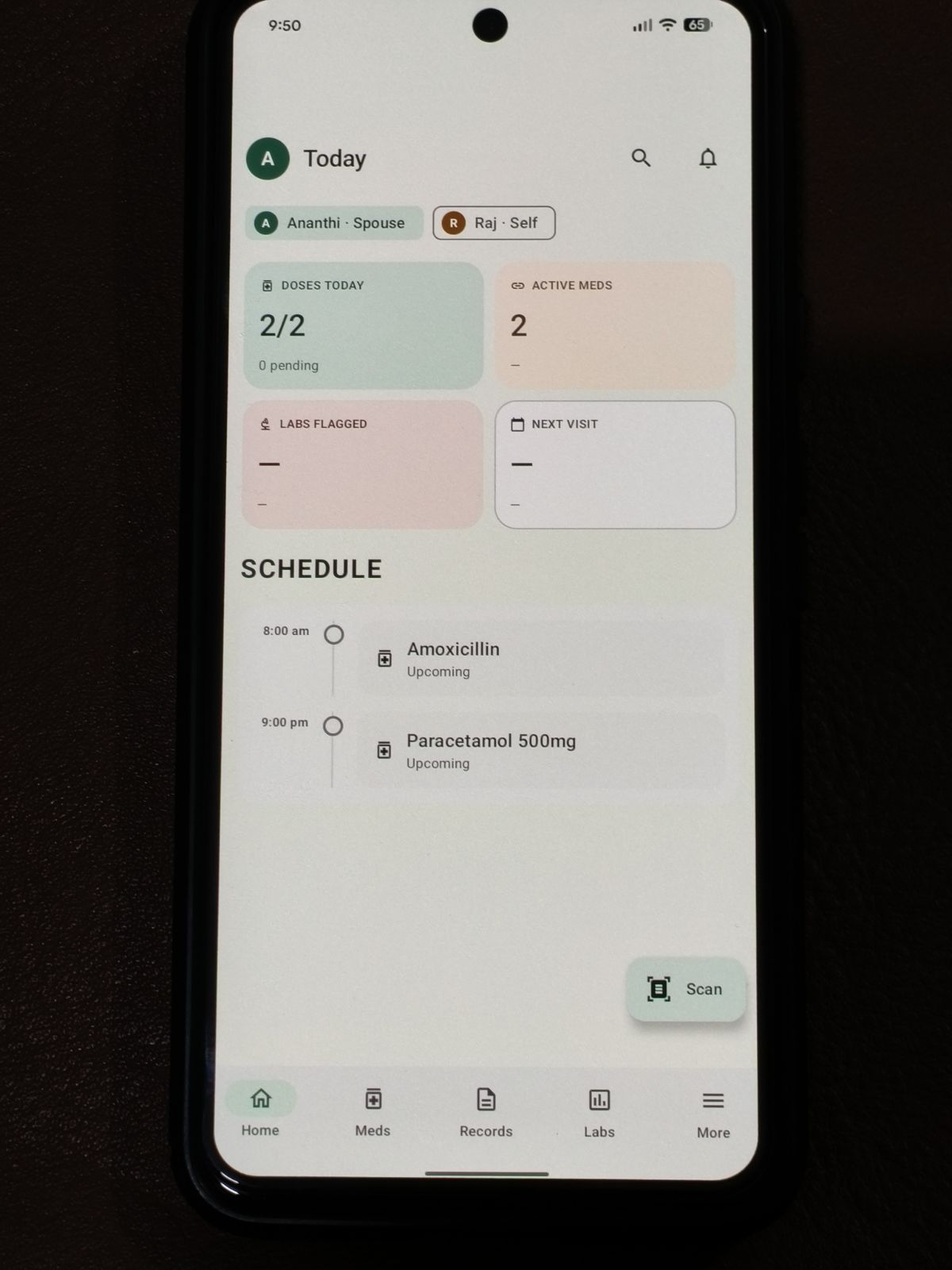
Side-by-side: Claude Design on the left, shipped app on the right. App captures live under static/images/medrecord/app/ (JPEG). See docs/medrecord-site-assets.md for filenames.
Auth screen
Vault-style entry (PIN / unlock before health data)—on-device protection first.
| Wireframe (Claude Design) | App |
|---|---|
 |  |
Dashboard
Home and overview—quick status and navigation into meds, records, labs, and more.
| Wireframe (Claude Design) | App |
|---|---|
 |  |
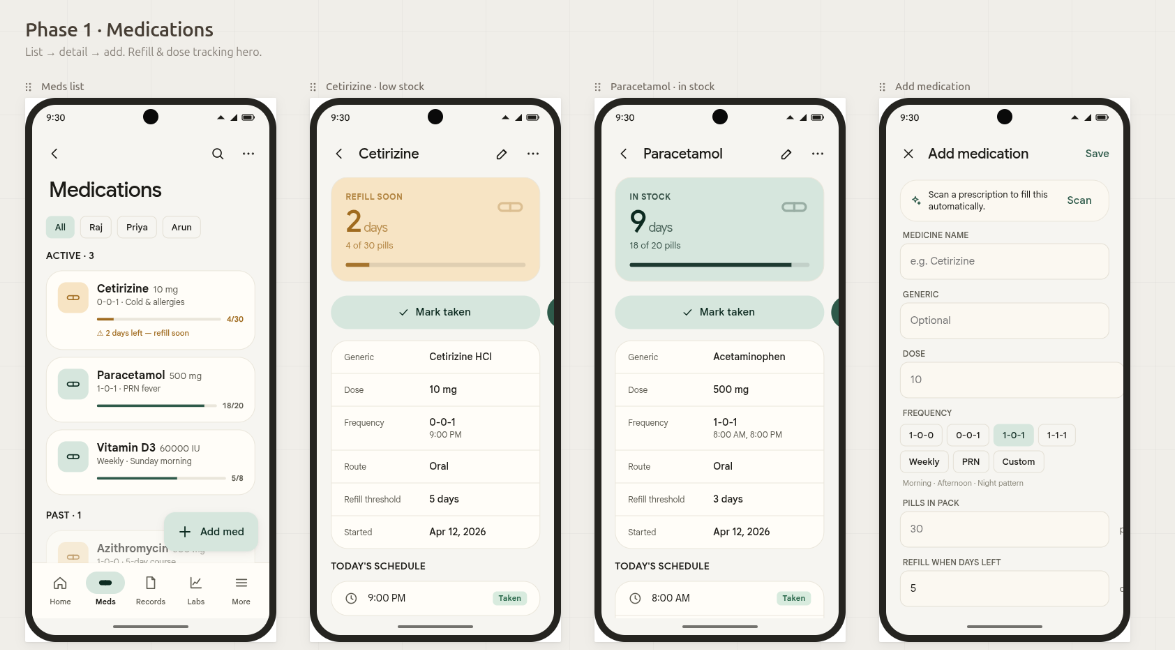
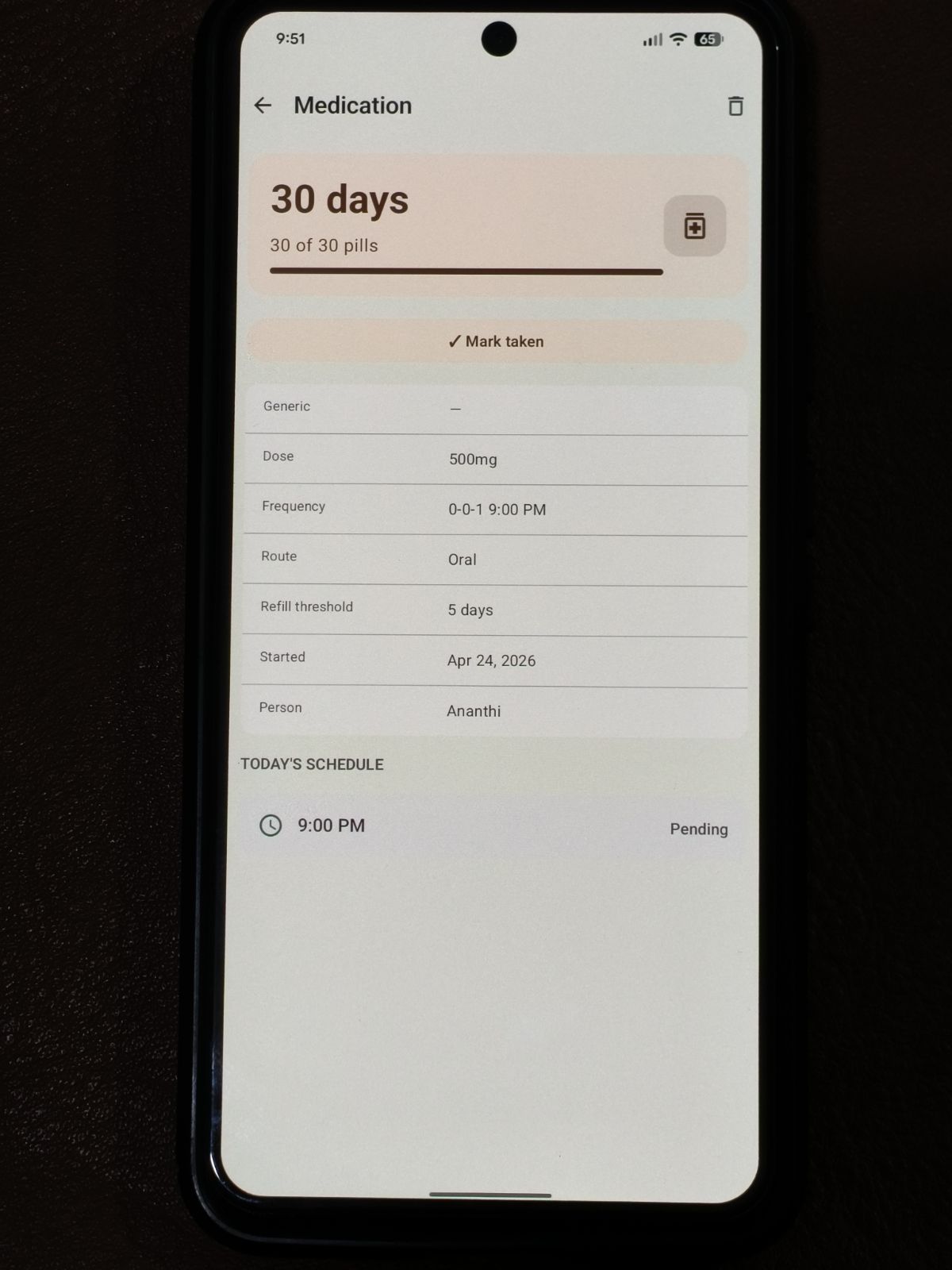
Phase 1 medications
Wireframe: Phase 1 medications scope (lists, dosing context, entry paths). App: medication detail from the running build (med-details.jpeg).
| Wireframe (Claude Design) | App |
|---|---|
 |  |
Tech stack
| Area | Choice |
|---|---|
| Language | Kotlin |
| UI | Jetpack Compose, Material 3 |
| DI | Hilt |
| Persistence | Room + SQLCipher (encrypted DB) |
| Preferences | DataStore |
| Background | WorkManager (Hilt workers, e.g. daily pill logic) |
| Static analysis | Detekt |
High-level architecture
core/— Database (entities, DAOs, migrations, seed), repositories, security (PIN, biometric wrap, auto-lock), storage (DocumentStore), lab matching, medication dosing helpers, reminder scheduling and notifications.feature/— Auth flow (vault, disclaimer gate) and main shell: bottom nav (Home, Meds, Records, Labs, More), nested flows (person detail, lab trends, add medication, medication detail, manual records, etc.).wireframes/— PNG references in the app repo; the README also mentionsMedRecord.html.
Phase 1 features (README + code)
- Vault — PIN, optional biometric, encrypted DB, auto-lock on background.
- Profiles / family — Multiple people; conditions from person detail.
- Medications — Manual entry, dosing patterns, refill-style alerts, WorkManager daily decrement worker; medication detail (mark taken, info table); delete medication from detail with confirmation (DAO
DELETE, repository layer, reminders cascading via Room FKs where modeled). - Labs — Manual results, canonical test catalog + fuzzy matching, trend UI when a numeric series exists.
- Records — Aggregated timeline-style UI with filters; delete for labs, encounters, and documents (repositories + encrypted file cleanup for documents where applicable).
- Reminders — Scheduling and notifications (including OS permissions).
- UI shell — Compose navigation, disclaimer on first run, theme in
core/ui/theme.
Schema and migrations
- Migration 1→2 — V2 schema creation plus lab canonical seed (
MedRecordMigrations,SchemaV2Creator,LabCanonicalSeed). - Migration 2→3 — Medication model extensions such as
genericName,packSize,scheduleType,route,eveningDoseMinuteOfDay,lastTakenAtEpochMs—supporting richer add/edit medication and dashboard refill logic.
Confirm entity and migration names in your checkout before you treat this as documentation of record.
Quality and maintainability
- Detekt in the same spirit as CI-style checks—alongside lint and tests per the README, e.g.:
./gradlew :app:detekt- UI refactors to satisfy rules: bundling composable parameters, extracting confirm-delete dialogs, so the codebase stays merge-friendly.
Design process
- Wireframe-driven UI (
wireframes/in the app repo), implemented in Compose with Material 3. - A clear disclaimer in-app and in the README: not for diagnosis or treatment decisions.
Challenges (what actually hurt)
Encryption + Room. Session lifecycle matters: opening and closing the DB, seeding after unlock (MedRecordDatabaseHolder, seed callback). Getting that wrong looks like flaky first launch or empty screens after biometric unlock.
Family + person scoping. Anything that lists meds, labs, or records has to respect the selected person; missing a filter becomes a privacy bug as much as a logic bug.
Deleting linked data. Documents need disk + DB consistency. For medications, reminders must follow deletes—Room FK CASCADE on ReminderEntity → MedicationEntity (where that schema applies) avoids orphan notifications.
Detekt vs Compose. Long @Composable signatures and fat parameter lists trigger rules quickly; smaller data classes and extracted dialogs kept refactors mechanical instead of argumentative.
What’s next
- Export or backup, optional cloud sync later, richer notifications, accessibility pass, Play release hardening (ProGuard notes in the README where applicable).
What I shipped (actions checklist)
- Defined scope: on-device, family, Phase 1 feature set; legal disclaimer.
- Chose Kotlin + Compose + Material 3 + Hilt.
- Implemented SQLCipher + Room with migrations and seed data for the lab catalog.
- Built main navigation (Home, Meds, Records, Labs, More) and nested screens (labs trend, person detail, add medication, medication detail, manual record entry).
- Implemented MedicationDosing / refill-style behaviour and DailyPillDecrementWorker scheduling.
- Implemented Records aggregation and delete paths (labs, encounters, documents + file store).
- Implemented medication delete on detail with confirmation and DB delete.
- Ran Detekt and refactored composables where rules complained.
- Documented build (
assembleDebug,installDebug, detekt/lint/tests) in the app README.
If you want the story to reflect only Cursor-assisted sessions, narrow this list to the slices you actually landed there (for example records delete, Detekt refactors, medication delete, and any migrations or UI from those sessions).
Closing
Different tools for different phases beat one model for everything: a detailed Opus plan and high-fidelity wireframes made Composer in Cursor productive instead of expensive thrash. If the repository or Play listing goes public, add a link here—same pattern as the vacation app.